
Help
Installation instructions
We recommend you to close all Internet Explorer windows before installation. Then run setup_bxp1_0.exe to start the installation procedure and follow all instructions.
After installation, open Internet Explorer window. You will see the Bioexplorer Toolbar in the Internet Explorer toolbar area.
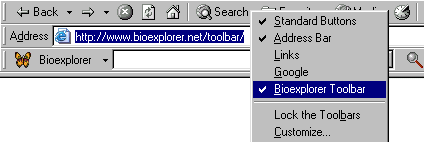
- If you do not see the Bioexplorer Toolbar, go to View > Toolbars and click on the Bioexplorer Toolbar option.
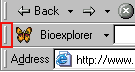
- If you see the toolbar in the “wrong” place (for example, in the area of Address bar), simply drag the tooolbar to the “right” position (left-bottom corner of IE toolbar area) by using its chevron.
Temporarily hiding the Bioexplorer Toolbar
You can hide (or activate) the Bioexplorer toolbar by right-clicking your mouse anywhere in the toolbar area and deselecting (selecting) it.
Uninstalling the Bioexplorer Toolbar
If you wish to remove the Bioexplorer Toolbar from your system, follow the instructions below:
- Close all running windows of Internet Explorer.
- Go to Start Menu > Settings > Control Panel > Add/Remove Programs.
- Select ‘Bioexplorer Toolbar’.
- Click the ‘Add/Remove…’ button.
- Click the ‘Yes’ button if you are asked whether you wish to ‘Remove Bioexplorer Toolbar.’